How to Watermark ID Copies Before You Share Them
Write who the copy is for and why, such as COPY FOR KYC ONLY, and add it across every page before sharing. It marks the copy, but it does not lock it: in our test the ID text stayed selectable underneath. Turning the pages into images makes the mark part of the picture.
What to write on the copy
Say who the copy is for and why, and add the date if you want to. COPY FOR KYC ONLY is the example used in this guide. The text can be up to 60 characters. Longer text shows this message: Use at most 60 characters.
The tool takes English letters, numbers and common symbols. Other scripts show this message: Use English letters, numbers and common symbols. Other scripts are not supported yet. So Hindi text cannot be used yet.
If the person asking for the copy says they need an unmarked one, ask them why and decide for yourself.
Add the watermark
The Add Watermark tool takes one PDF, up to 100 MB, and marks every page. There is no way to mark only some pages.
- Select
Choose PDFand pick your file. - In
Watermark text, type your wording. - Choose the Angle:
DiagonalorStraight. - Choose the Opacity:
15 %,30 %(the default) or50 %. - Choose the Colour:
Grey(the default),RedorBlue. - Choose the Size:
Small,Medium(the default) orLarge. - Look at the preview of page 1. The name and number must still be readable. If they are hard to read, use a lower opacity. The right setting depends on the document, so judge it on your own file.
- Select
Add watermark, thenDownload. UseDo anotherfor the next file.
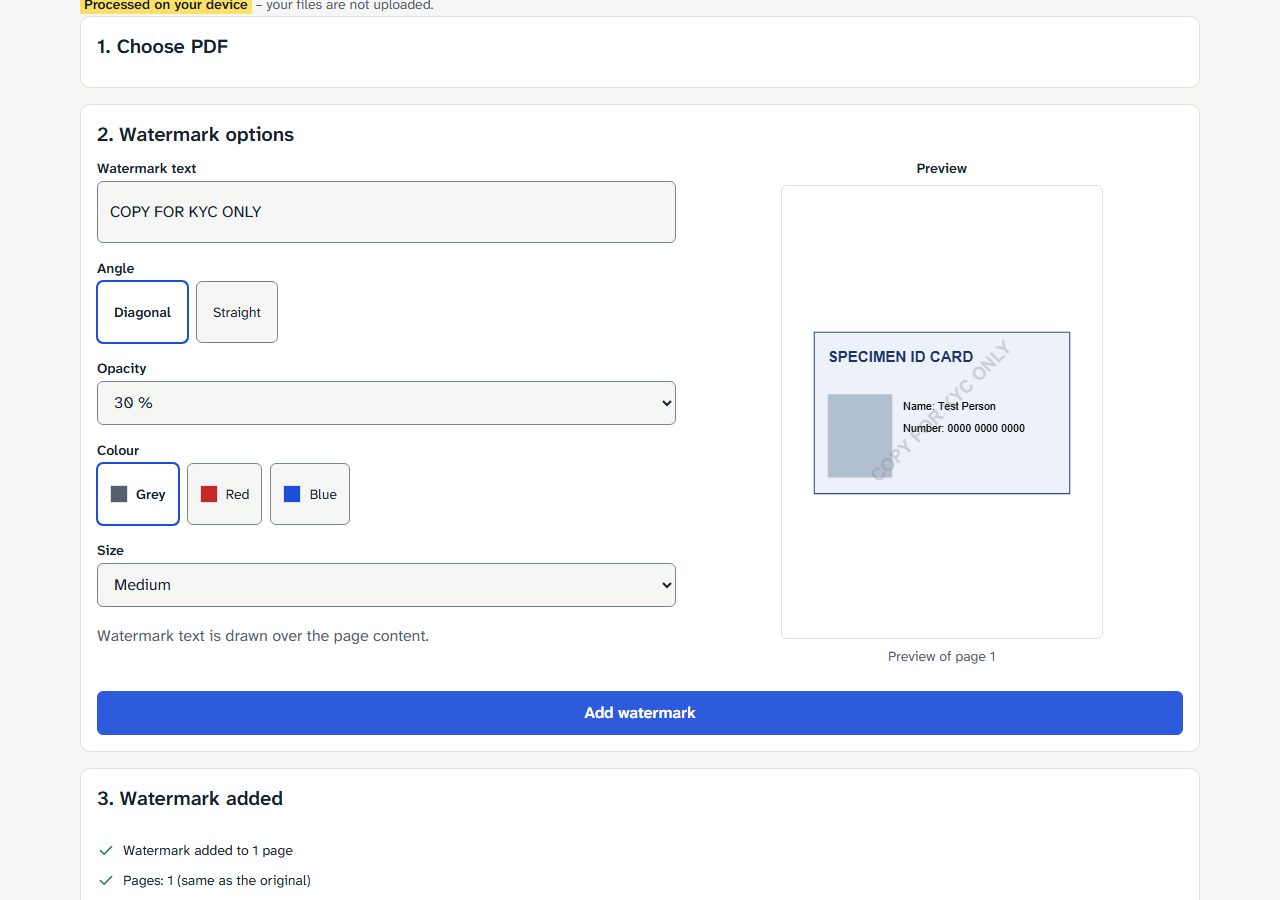
The tool makes a new file and does not change the one you chose. Keep your unmarked original.
If the PDF has a password, you will see: This PDF has a password. Unlock it first. Use Unlock PDF only with a password you already know.
What a watermark does and does not do
A watermark is a label you can see. The tool's own page says it is not copy protection, and that anyone with a PDF editor can remove it.
We added the mark to a generated test ID card, then selected the text in the new file. SPECIMEN ID CARD, Name: Test Person, Number: 0000 0000 0000 and COPY FOR KYC ONLY were all still there as text. The file grew by about 476 bytes, because the mark is a small text layer drawn over the page. The original text stays in the file underneath it.
A password is a different job. Protect PDF controls who can open the file.
Make the mark part of the page
If you do not want any selectable text left in the copy, turn the marked page into a picture and build a new PDF from it:
- Open the marked file in PDF to JPG and use the Standard setting.
- Open the JPG in Image to PDF and save the new PDF.
Here is what each step gave us:
| Step | Result |
|---|---|
| Add Watermark at 15 %, 30 % or 50 % | specimen-id-watermarked.pdf, about 16,293 bytes (about 15.9 KB), about 476 bytes added |
| Text selected from that PDF | SPECIMEN ID CARD, Name: Test Person, Number: 0000 0000 0000 and COPY FOR KYC ONLY are all still there as text |
| PDF to JPG, Standard, on that PDF | wm-30-page-1.jpg, 1239 × 1754 px, 81.4 KB in Chromium, 98.1 KB in Firefox |
| Image to PDF, on that JPG | My PDF.pdf, 72.8 KB in Chromium, 88.4 KB in Firefox, 1 page, no selectable text |
After the image step there was no text left to select. The file was also several times larger, and its size differed by browser.
This step does not make a copy tamper-proof. An image can still be edited or cropped.
What we tested
We ran these steps on 3 November 2026 on the live tools, in Chromium and Firefox. The input was a generated one-page test PDF, a "SPECIMEN ID CARD" with text and a picture, 15,817 bytes (about 15.4 KB). No real document was used. The picture above comes from a second generated test card, so its layout differs a little.
Nothing was sent to a server during these steps: the browser made no upload request.
We tested no bank, app or portal, and we do not promise a marked copy will be accepted.
Frequently asked questions
Can someone remove the watermark from the PDF?
Yes. The tool's page says that anyone with a PDF editor can remove it.
Can I watermark only some pages?
No. The tool marks every page in the file.
Can I write the watermark in Hindi?
Not yet. The tool takes English letters, numbers and common symbols.
Does a watermark stop someone from opening the file?
No. To control who can open a file, use a password.
Add your watermark
Check the preview, keep your original, and mark your ID copy here.