How to Crop a Photo to Passport Size
Passport size has no single meaning, so read the form first. For a 3.5 × 4.5 cm shape, keep Free selected and enter a width and height in that 7:9 proportion, such as 700 × 900 pixels. Then check the file against the form's own pixel and KB limits.
What passport size means on a form
Forms differ, so the form's own numbers come first. Our IBPS size guide lists a photo of 200 × 230 pixels and 4.5 × 3.5 cm, 20–50 KB, from the notice it cites. 200 × 230 is not the 7:9 shape.
If your form gives pixels, enter those pixels instead of the numbers in this guide. This guide covers the shape only. It does not cover rules on head size, background or expression, which come from your form.
Crop to the shape
Image Cropper takes one JPG, PNG or WebP image, up to 50 MB. Start from your largest original, so that you are not enlarging a small picture.
- Choose your picture.
- Under
Aspect Ratio, keepFreeselected. - Under
Crop Area, enter theWidthandHeight, such as700and900. - Drag the crop area to move it, or set its position in pixels with
XandY. KeepShow crop gridon to help you centre the face. - If the picture is turned the wrong way, use
LeftorRightunderRotate & Flip. - Under
Output Format, choose the format your form asks for.Qualitystarts at 92%. - Select
Crop Image. The result readsCropped image ready, followed by the pixel size and KB. - Select
Download.
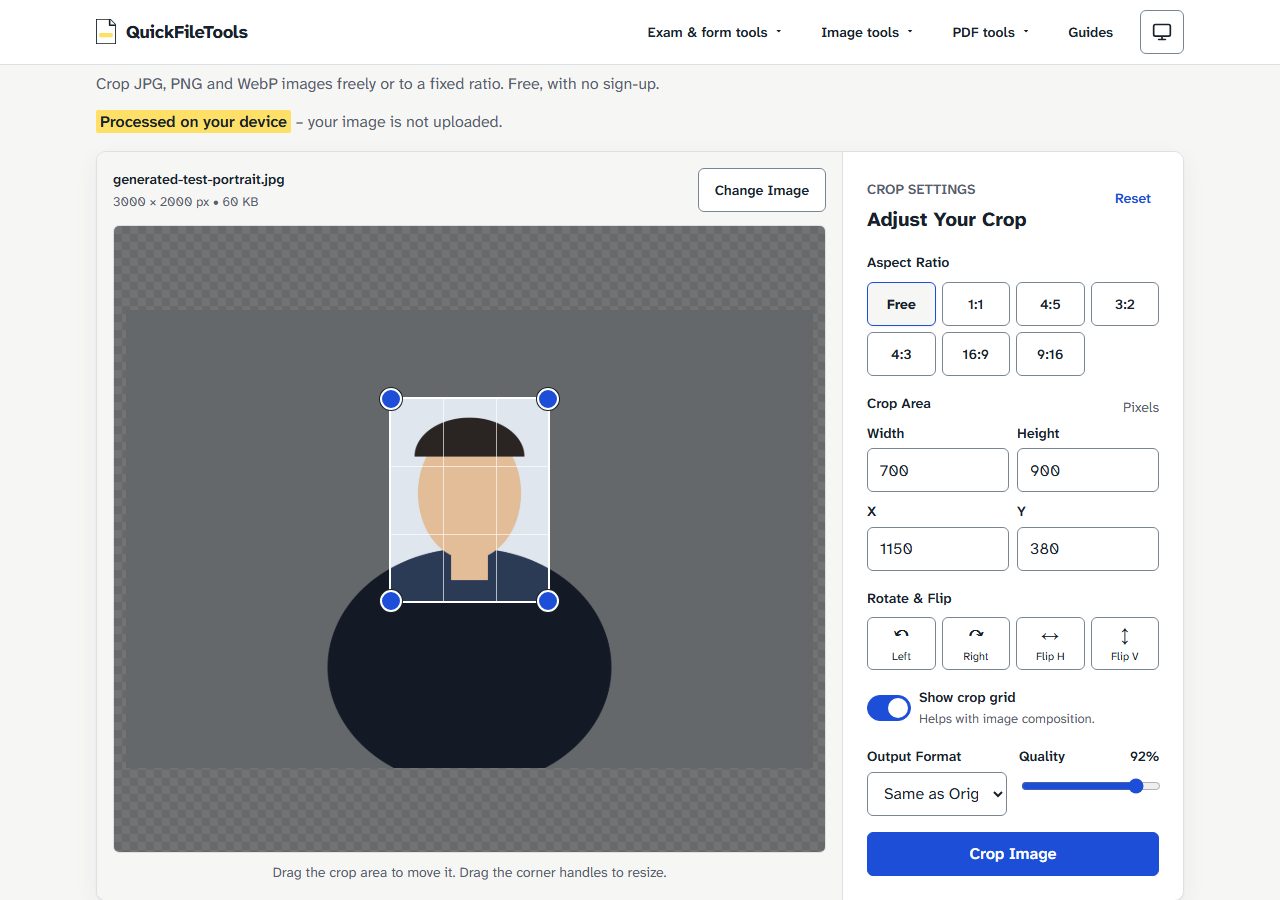
The new file name ends with -cropped- and the pixel size. The picture you chose is not changed, so keep it in case you need a different crop.
Why not use the 4:5 button
The ratio buttons are Free, 1:1, 4:5, 3:2, 4:3, 16:9 and 9:16. There is no 7:9 or passport button.
4:5 looks close, but it is a different shape from 3.5 × 4.5 cm. At a width of 700 pixels, 4:5 gives a height of 875, while the 7:9 shape needs 900. With Free selected, both numbers are yours to set.
Pixels, centimetres and KB
Shape, pixels, centimetres and KB are four separate things.
Shape. 3.5 × 4.5 cm is the proportion 7:9. So 700 × 900 and 350 × 450 both have that shape.
Pixels. At 300 DPI, 3.5 × 4.5 cm is about 413 × 531 pixels (cm ÷ 2.54 × 300). That is only arithmetic. A form's own pixel numbers come first.
Centimetres. A crop sets pixels only. The JPGs we downloaded stored no print size, so centimetres are not stored in the file.
KB. A KB limit is a separate job from the crop, and the table below shows why.
What we measured
We ran these crops on 4 November 2026 on the live tool, in Chromium and Firefox. The input was a generated 3000 × 2000 px JPG, a drawn test picture. No real photo was used. Output was JPG, with Quality at its default of 92%. The picture above uses a second, plainer test drawing.
| Width × Height entered | Downloaded file | Chromium | Firefox |
|---|---|---|---|
| 700 × 900 | generated-test-portrait-cropped-700x900.jpg |
60.6 KB | 96.0 KB |
| 413 × 531 | generated-test-portrait-cropped-413x531.jpg |
24.0 KB | 37.3 KB |
| 350 × 450 | generated-test-portrait-cropped-350x450.jpg |
18.8 KB | 29.0 KB |
Each file came out at exactly the pixels entered, read from the downloaded file. The same crop had a different KB size in each browser. With this test picture, 350 × 450 was under 20 KB in Chromium and over it in Firefox. Check the size of your own file, and do not expect these numbers.
Nothing was sent to a server during the test: the browser made no upload request.
We tested no form or portal, and we do not promise that a cropped photo will be accepted.
If the file does not fit the form
- To reach exact pixels and a KB range in one step, use Exam Photo Resizer.
- To change a finished photo's pixels, use Image Resizer.
- To reduce KB, use Compress Image. Its Target size option may also reduce the pixel size, so check the pixels again afterwards.
Frequently asked questions
Is there a passport size button in Image Cropper?
No. Keep Free selected and type the Width and Height.
Can I set centimetres in the cropped file?
No. The crop area is in pixels, and the JPGs we downloaded stored no print size.
Why is my file a different KB size from your table?
The size depends on the picture, and the same crop had a different size in each browser we tested.
What if my cropped photo is over the form's KB limit?
Reduce the KB with Compress Image, then check that the pixels still match the form.
Crop your photo
Read your form's numbers first, then crop your photo to that size.