IBPS Photo, Signature, Thumb and Declaration Sizes
In the IBPS PO/MT-XV (2025) guidelines, the photo is 200 × 230 pixels and 20–50 KB, the signature 140 × 60 pixels and 10–20 KB, the left thumb 240 × 240 pixels and 20–50 KB, and the handwritten declaration 800 × 400 pixels and 50–100 KB. Pixel sizes are marked "preferred". Check your own notice.
Where these numbers come from
Everything here comes from the IBPS PO/MT-XV upload guidelines (2025), which we read on 2 November 2026. We did not read a Clerk notice or a 2026 notice, so do not assume these numbers apply to Clerk, RRB, SO or a later year. Compare them with the notice for your own exam, because that notice decides.
IBPS sizes at a glance
| Document | Pixels (preferred) | Size in cm | File size | Rules |
|---|---|---|---|---|
| Photo | 200 × 230 | 4.5 × 3.5 | 20–50 KB | Recent passport style colour picture; light, preferably white, background |
| Signature | 140 × 60 | Not given | 10–20 KB | White paper, black ink pen; not in capital letters |
| Left thumb impression | 240 × 240 in 200 DPI | 3 × 3 | 20–50 KB | White paper, black or blue ink; jpg or jpeg |
| Handwritten declaration | 800 × 400 in 200 DPI | 10 × 5 | 50–100 KB | English, your own handwriting, white paper, black ink, not in capital letters; jpg or jpeg |
| 10th standard or equivalent certificate | Not given | A4 page | Not over 500 KB |
The guidelines warn that until the photo and signature meet these specifications, the system will not allow the candidate to move forward to the next stage of application. Remember that pixels and KB are separate checks: a file can match one and miss the other.
Photo rules
Use a recent passport style colour picture against a light, preferably white, background. Look straight at the camera. Caps, hats and dark glasses are not acceptable. Religious headwear is allowed, but it must not cover your face. The guidelines also list a shadow on the face, a face covered with a mask and a blurred image as things to avoid.
If you scan a printed photo, the guidelines say to set the scanner to at least 200 DPI and True Colour, then crop to the edge of the picture.
You will also be asked for a live photo, taken with a webcam or phone through Capture Photo or Click here to Scan. Our tool does not do that part.
Signature rules
Sign on white paper with a black ink pen, and not in capital letters. The rule that matters most comes later: if your signature on the attendance sheet or call letter does not match the one you uploaded, you will be disqualified. So upload the signature you will actually use on exam day.
Left thumb impression
Put your left thumb impression on white paper with black or blue ink.
If you do not have a left thumb, the guidelines set this order:
- Your right thumb.
- If both thumbs are missing, a finger of the left hand, starting from the forefinger.
- If there are no fingers on the left hand, a finger of the right hand, starting from the forefinger.
- If no fingers are available, the left toe.
In these cases, the uploaded document must state which finger or toe was used, and on which side.
Handwritten declaration
Write this text in English, on white paper, with black ink, in your own handwriting and not in capital letters:
"I, __________ (Name of the candidate), hereby declare that all the information submitted by me in the application form is correct, true and valid. I will present the supporting documents as and when required."
If it is written by anybody else, or in any other language, the application will be considered as invalid. Candidates who cannot write may have the text typed, and put their left thumb impression below it if they cannot sign either.
The 10th standard or equivalent certificate is separate: a PDF on A4 pages, not over 500 KB. If yours is too big, you can compress the PDF.
How to resize the files
Use our IBPS photo and signature resizer. It runs in your browser, so your files are not uploaded.
- Under
Exam, chooseBank exams (IBPS, SBI). - Under
Document, choosePhoto,Signature,Left thumb impressionorHandwritten declaration. - Click
Choose imageand select your file. - Compare the result lines
Size:,Dimensions:andFormat:with your notice. - Click
Downloadto save the JPG.
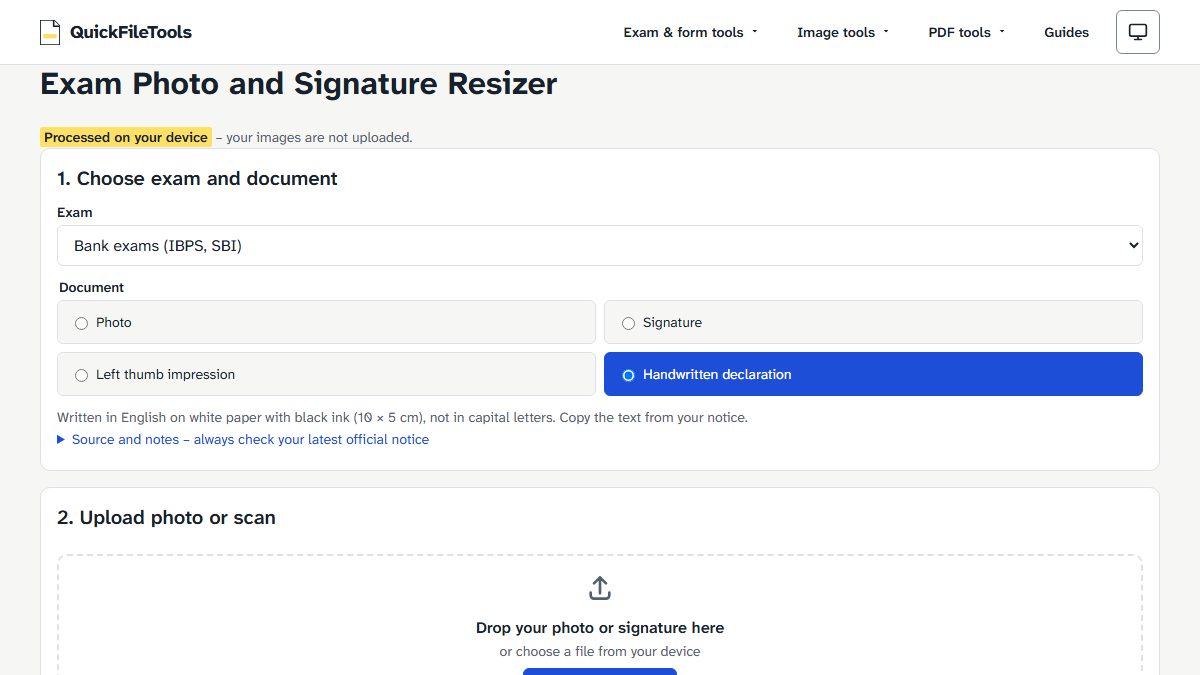
The tool can make a small file bigger to reach a minimum. When it does, it tells you: Small file made bigger with empty data. The picture itself is unchanged.
Mistakes the guidelines warn about
- File outside the specification: the guidelines say an error message appears if the file size and format are not as prescribed. If that happens, go through the reasons a portal refuses an upload.
- Capital letters: a signature or declaration in capital letters shall not be accepted.
- Mismatched signature: a signature on exam day that does not match the upload means disqualification.
- Unclear images: an unclear or smudged face, signature, thumb impression or declaration may lead to rejection. Check the preview. You may edit and upload again before you submit the form.
- Wrong place: upload each document in its own place. If the photo is not in the place for the photo, you may not be allowed to appear for the exam.
- Someone else's work: the signature, thumb impression and declaration must be your own.
What we tested
On 2 November 2026 we ran a generated test image through our tool in Chromium, using the Bank exams (IBPS, SBI) preset. The image was 3000 × 2000 pixels with no real person in it. We read the sizes back from the downloaded files.
| Document | Output file | Measured |
|---|---|---|
| Photo | ibps-sbi_photo_200x230_20kb.jpg |
20 KB, 200 × 230 |
| Signature | ibps-sbi_signature_140x60_12kb.jpg |
11.9 KB, 140 × 60 |
| Left thumb impression | ibps-sbi_thumb_240x240_20kb.jpg |
20 KB, 240 × 240 |
| Handwritten declaration | ibps-sbi_declaration_800x400_76kb.jpg |
76.5 KB, 800 × 400 |
For the photo and thumb impression, the tool showed its empty-data note. This tested file sizes and dimensions only. We did not test whether IBPS accepts a file.
Frequently asked questions
Can I write the declaration in Hindi?
Not under these guidelines. They ask for English only, and say that a declaration in any other language makes the application invalid.
Can I sign in capital letters?
No. The guidelines say a signature in capital letters shall not be accepted.
What if someone else writes my declaration?
The guidelines say the application will then be considered invalid. The only exception they describe is for candidates who cannot write, who may have the text typed and add their left thumb impression.
Does this tool take the live photo?
No. The live photo is taken in the application form itself, by webcam or phone. Our tool prepares the image files you upload.
Prepare your IBPS files
Keep your own notice open, then resize each document to the numbers it gives. Check every result line before you upload. Your files stay on your device.