How to Remove a Password From a PDF (When You Know It)
To remove a password from a PDF you can open, select your document in Unlock PDF, enter the password you know, and download the decrypted copy. All processing runs directly on your device, so your file and password are never uploaded. This tool cannot recover or guess a forgotten password.
Before you start
To remove protection from a PDF, you must already know the password that opens it. The tool does not crack, guess, or recover missing credentials.
Passwords on PDF files are case-sensitive. A password like Statement-2026 will fail if entered as statement-2026. Check whether the Caps Lock key is active on your keyboard before typing.
You can process one PDF file at a time, with a file size up to 100 MB. Only remove a password from a file you are allowed to open and keep unprotected.
Step-by-step: how to remove the password
You can remove the password in your browser in four steps:
- Choose your protected PDF. Open the tool and click Choose PDF, or drop your document into the box. The tool accepts one PDF file up to 100 MB.
- Enter the PDF password. Type the known password into the PDF password field. Click Show to see what you typed and check the capital letters.
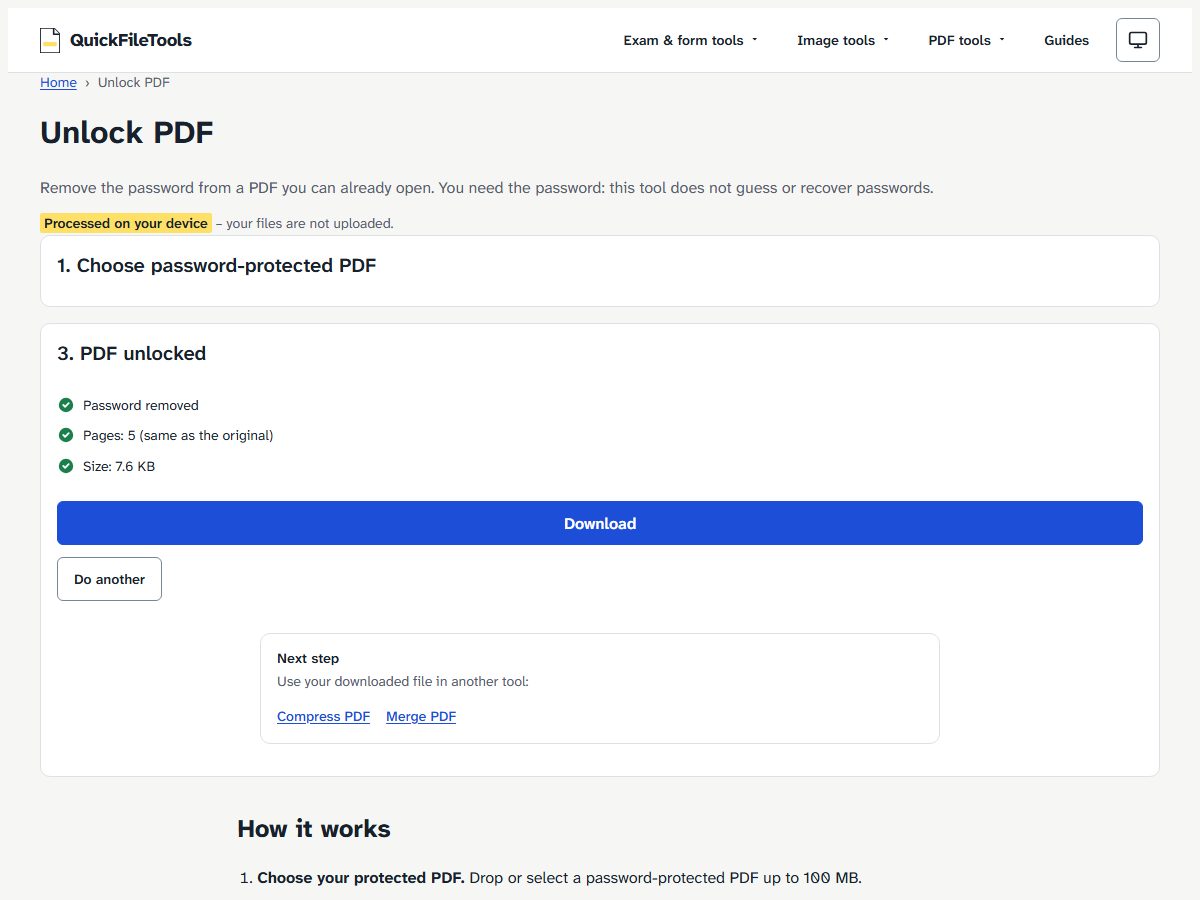
- Select Unlock PDF. The tool verifies the password with pdf.js, decrypts the document using qpdf running in WebAssembly, and checks the unlocked copy before you download it to confirm that the page count matches the original file.
- Download the unencrypted copy. Click Download to save your file. The output is named
<name>-unlocked.pdf. Your original file on your computer remains unchanged. If you have another document to process, click Do another.
What kinds of PDF passwords does it remove?
PDF files can use two separate types of passwords. According to the qpdf manual on PDF encryption, the original intent of PDF encryption was that there would be two passwords: a user password and an owner password.
In plain words:
- The user password is the password to open the file. When a document asks for a password before showing any pages, it requires a user password.
- The owner password controls permissions, such as limits on printing or copying text. As the qpdf documentation explains, a conforming reader is supposed to obey the security restrictions if the file is opened using the user password, but not if the file is opened with the owner password. A file can also be encrypted with an empty user password, meaning the file is encrypted but not password-protected to open.
Unlock PDF works with the password to open. It runs qpdf, an open-source tool released under the Apache-2.0 licence, compiled to WebAssembly inside your browser. The qpdf manual notes that 40-bit encryption always uses RC4, while 256-bit encryption always uses AES. In its chapter on weak cryptography, the manual explains that when PDF files are encrypted using 40-bit encryption or 128-bit encryption without AES, the weak RC4 algorithm is used.
The table below shows how the tool handles different encryption settings:
| Encryption of the test file | Password asked? | Result (both browsers) |
|---|---|---|
| AES-256 | yes | Password removed, Pages: 5 (same as the original), 7.6 KB |
| AES-128 | yes | Password removed, 5 pages, 7.5 KB |
| RC4 128-bit | yes | Password removed, 5 pages, 7.5 KB |
| RC4 40-bit | yes | Password removed, 5 pages, 7.5 KB |
| Empty password to open, owner password set (print/copy limits) | no | This PDF opens without a password, so there is nothing to unlock. No file. |
| No encryption at all | no | same message, no file |
In our tests, every downloaded file opened in a second PDF library (pdf-lib) with no password and had 5 pages. For these small files, the time from clicking Unlock PDF to the Download button was 0.9 to 1.7 seconds in Chromium and 1.5 to 2.2 seconds in Firefox. Processing times for larger files were not measured.
What if the tool says nothing to unlock?
If you pick a PDF that already opens without a password, the page shows an error: This PDF opens without a password, so there is nothing to unlock. The tool does not create an output file.
This message appears in two situations. First, normal unencrypted PDF files have no password to remove. Second, files that have only an owner password set to limit printing or copying will open freely without asking for a password. Because Unlock PDF only removes the open password, it does not alter unencrypted files or remove print and copy restrictions.
What if the page says the password is not right?
If you type the wrong password, the page displays: That password is not right. Check capital letters and try again. The Download button remains disabled.
PDF passwords are case-sensitive. For example, typing statement-2026 instead of Statement-2026 will cause the verification to fail. Click the Show button to see what you typed and check the capital letters.
Unlock PDF does not guess, crack, or recover a forgotten password. If you forgot the password, you must ask whoever sent the file, such as your bank, employer, or office, for the password or request an unprotected copy.
Keep the unlocked copy safe
Once a password is removed, anyone who gets the file can open and read it. Store your unprotected copy in a secure folder on your device.
If you need to share the document or want to add a password back on later, you can secure it with Protect PDF. Our guide on how to password-protect a PDF shows each step.
If your unencrypted document is too large for an email attachment or portal upload, the page displays a next-step link to Compress PDF to reduce its file size on your device.
How we tested
We tested Unlock PDF on the live site on 2026-10-30 using Playwright in Chromium and Firefox.
The test files we made were based on a 5-page text PDF created with pdf-lib (7,587 bytes, with no real data). We then encrypted copies with qpdf in four formats: AES-256, AES-128, RC4 128-bit, and RC4 40-bit, all using the same password. We also tested an unencrypted copy and a file with only an owner password set.
Every downloaded copy opened without a password in pdf-lib and contained 5 pages. Wrong password handling was verified using statement-2026 against Statement-2026.
Frequently asked questions
Can I remove a password I forgot?
No. You must enter the correct password to open and decrypt the document. The tool does not guess, crack, or recover forgotten passwords. If you do not have the password, ask whoever sent the document for the password or request an unencrypted copy.
Is my PDF uploaded to a server?
No. All processing runs entirely in your browser using WebAssembly. Your file and password never leave your computer or phone. You can follow our guide to check that a tool does not upload files to verify this by testing offline or inspecting the browser network panel.
Does the tool work on a mobile phone?
Yes. The tool runs in mobile browsers such as Chrome on Android. Decryption happens directly on your device, so you do not need to install additional apps.
Will the unlocked PDF look the same as the original?
The downloaded file retains the same page count, which the tool checks before offering the download. We did not compare every pixel, so we do not claim that visual rendering is identical across every viewer.
Remove a known password from your PDF
When you know the password to open a document, you can remove a PDF password on your device. The tool makes an unprotected copy in your browser, and the file and password are not uploaded.