Best Image Format for WhatsApp, Instagram and Email
JPG is the best format for photos on WhatsApp, Instagram and email because it opens on every phone and keeps files small. PNG works best for screenshots, logos and text graphics. If you have photos saved in PNG, convert PNG to JPG before sending to keep emails under 25 MB and fit Instagram limits.
Which format should you choose for each platform?
The right image format depends on where you share the picture and what kind of graphic it contains. Photographs belong in JPG format across WhatsApp, Instagram and email, while screenshots, line drawings and logos are better kept as PNG.
Here is a summary of recommended formats, dimensions and platform limits based on official documentation:
| Destination | Recommended format | Size or dimension limit | What happens to the file |
|---|---|---|---|
| WhatsApp chat | JPG for photos; PNG for graphics | Standard or HD quality toggle | Media files are usually compressed when shared |
| WhatsApp document | JPG or PNG | Maximum 2 GB per document | Sent as a file attachment up to 2 GB |
| Instagram feed post | JPG | Width up to 1080 px (height 566 to 1440 px) | Sized down to 1080 px wide; unsupported ratios cropped |
| Personal Gmail | JPG for photos; PNG for graphics | 25 MB total attachments per email | Files over 25 MB become a Google Drive link |
Phones and computers open JPG without any extra app. Saving a camera photo as PNG makes the file several times bigger (measured below), and a PNG made from a JPG photo cannot be sharper than the JPG it came from.
What format and quality settings should you use on WhatsApp?
JPG is the practical format for sending photos on WhatsApp because it keeps file sizes small and transfers quickly over mobile data.
According to the official WhatsApp media help page, "The quality of media uploaded to WhatsApp might be lower than the original version because media files are usually compressed when shared."
WhatsApp lets you pick the quality yourself: "To adjust the quality of an attached photo or video, tap … > Standard quality or HD quality before tapping" send.
However, HD quality is not available everywhere in the app. WhatsApp notes that "HD media isn't currently available for status updates or profile pictures." For profile pictures, the help page states: "we suggest using an image with height and width of at least 192 pixels."
If you want to share a photograph without standard chat compression, you can also attach the photo as a Document (up to 2 GB). WhatsApp help documentation confirms: "For documents, the maximum file size allowed is 2 GB."
We did not test what WhatsApp compression does to pixels or file size, and we do not claim that a document arrives byte-for-byte unchanged. WhatsApp help pages also do not list an exact megabyte limit for standard chat photos, so we do not state an unverified size limit.
What image format and dimensions work best for Instagram?
JPG is the best image format for Instagram photos, and sizing your pictures to 1080 pixels wide ensures they display cleanly.
The official Instagram image resolution help page states that the service uploads photos "up to a width of 1080 pixels". When you share an image, Instagram keeps its resolution "as long as the photo's aspect ratio is between 1.91:1 and 3:4 (a width of 1080 pixels with a height between 566 and 1440 pixels)".
If your image uses an aspect ratio outside that range, Instagram notes that it is "cropped to fit a supported ratio". In addition, if you share a photo narrower than 320 pixels wide, Instagram enlarges it to 320 pixels. If you share a photo wider than 1080 pixels, Instagram sizes it down to 1080 pixels wide.
Because Instagram resizes every wide image down to a width of 1080 pixels, uploading an original 12-megapixel camera photo gives you no extra resolution on screen. Resizing the picture yourself before posting gives you control over the exact framing and avoids unexpected automated crops.
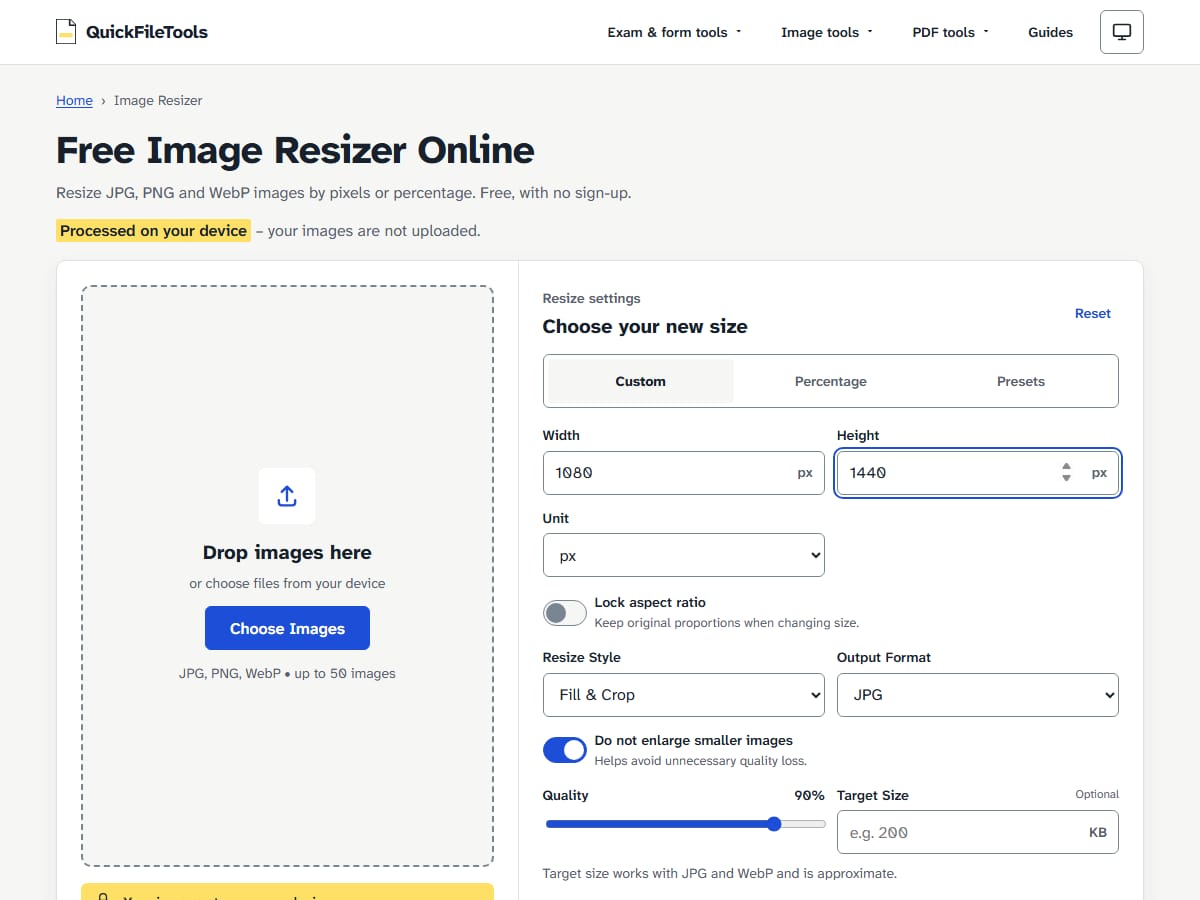
You can use Image Resizer to prepare your images before uploading. The tool includes a preset for 1080 × 1350 pixels (a standard 4:5 portrait post) and a Custom size option. Setting a Custom size to 1080 × 1440 pixels targets the tallest 3:4 portrait size that Instagram keeps.
In the tool, selecting "Fill & Crop" crops your image to fit your chosen dimensions exactly. Selecting "Fit" keeps the whole picture and fits it inside your target box without trimming any edges.
How does image format affect email attachments?
JPG is the best choice for email attachments because it keeps individual photo file sizes small enough to send several pictures in one message.
According to official Gmail attachment help, "For personal Gmail accounts, the limit is 25 MB." For work and school accounts, Google Workspace administrators define the attachment limit. If your total attached files exceed 25 MB, Gmail "automatically removes the attachment and adds it as a Google Drive link in the email."
When you attach photos saved in PNG format, you run into that 25 MB limit quickly. To see how image format and dimensions change file size, we tested a 12-megapixel photograph across both formats:
| Output | Chromium | Firefox |
|---|---|---|
| Original JPG, 3024 × 4032 | 2.29 MB | 2.29 MB |
| JPG, 1536 × 2048 | 759 KB | 926 KB |
| JPG, 1080 × 1440 (Instagram's largest 3:4) | 446 KB | 554 KB |
| PNG, 1080 × 1440 | 3.34 MB | 2.95 MB |
| PNG, full size 3024 × 4032 | 17.0 MB | 15.4 MB |
These measurements show three clear results for email and file sharing:
First, saving a full-size camera photo as a PNG creates an unnecessarily heavy file. In Chromium, the 3024 × 4032 photo measured 2.29 MB as a JPG and 17.0 MB as a PNG. That makes the PNG about 7 times bigger than the original JPG. In a personal Gmail message with a 25 MB limit, you could attach only one 17.0 MB PNG file. With the original 2.29 MB JPG, you could attach about ten photos into that same message.
Second, resizing the JPG to 1080 × 1440 pixels reduced the file to 446 KB in Chromium. That is about a fifth of the original 2.29 MB size. At that size, about 45 to 56 photos fit in 25 MB (446 KB in Chromium, 554 KB in Firefox; simple division).
Third, the same resize settings produce different file sizes in different browsers. In our test, the 1080 × 1440 JPG produced a 446 KB file in Chromium and a 554 KB file in Firefox.
We did not test attachment limits or file handling rules for other email providers such as Outlook or Yahoo Mail.
When should you send a PNG instead of a JPG?
PNG is the right format to choose when you send screenshots, digital signatures, line art, diagrams and logos.
PNG uses lossless compression, so every pixel of a screenshot, letter or logo edge is kept exactly. JPG is lossy, and small text and thin lines can come out soft after conversion.
As measured in our guide on why JPG files can be bigger than PNG, flat graphics and screenshots with few colours produce smaller files in PNG than in JPG. For a full breakdown of how lossless encoding and colour types work, see our guide on what a PNG file is.
PNG is also required whenever an image needs a transparent background. JPG does not support transparency. When you convert a transparent PNG to JPG, every see-through pixel must receive a solid background colour. Our tools let you choose that background colour (white by default), helping you avoid the black backgrounds explained in why transparent PNGs turn black when converted to JPG.
However, saving everyday camera photos as PNG is inefficient. Our test photo shows the cost: 17.0 MB as a full-size PNG against 2.29 MB as the original JPG.
Common mistakes when preparing images for sharing
Avoiding these common errors will help you prevent rejected uploads, unwanted crops and email delivery errors:
- Sending camera photos as PNG: our 12-megapixel test photo was about 7 times bigger as a PNG than as the original JPG, and it gained no detail.
- Relying on quality sliders to meet exact kilobyte caps: Moving a quality slider down does not guarantee a specific file size in kilobytes. If an upload portal requires an image under 50 KB or 100 KB, use Compress Image in target size mode. For details on how quality sliders operate, read our guide on JPG quality settings and compression.
- Letting social apps crop your composition: Because Instagram crops images outside the 1.91:1 to 3:4 aspect ratio range, resize your photo to a 1080 px width with a supported ratio before posting.
- Attaching uncompressed camera batches to email: Sending multiple full-size photos can easily exceed Gmail's 25 MB ceiling, converting your files into Google Drive links.
How to resize and convert photos with browser tools
You can prepare your photos before sending using browser tools without installing software:
- If your photo is saved as a PNG, use our PNG to JPG converter to turn it into a compact JPG. The tool accepts PNG files up to 25 MB each and handles up to 10 images at once.
- Open the Image Resizer to set exact pixel dimensions. For Instagram, enter 1080 px for the width and choose "Fill & Crop" to fit your target height, such as 1350 px or 1440 px.
- If you need to stay below an email attachment limit, use Compress Image to reduce total file weight.
All processing runs directly inside your web browser. Your images stay on your device and are never uploaded to our servers.
How we tested photo resizing and file sizes
On 2026-10-30, we tested photo resizing and format conversions on the live QuickFileTools site using automated Playwright tests in Chromium and Mozilla Firefox.
We tested a real 12-megapixel photograph of a street phone box (3024 × 4032 pixels, 2.29 MB JPG, public domain CC0 from Wikimedia Commons). We resized the file using the Image Resizer tool with Custom dimensions, pixel units, Fill & Crop mode, and the default quality setting of 90 percent.
In these test numbers, 1 MB equals 1,000,000 bytes and 1 KB equals 1,000 bytes.
Testing limitations: We did not test uploads to live WhatsApp or Instagram accounts, and we did not test email providers other than Google's documented personal Gmail limits.
FAQ
Why does my WhatsApp photo look blurry?
The official WhatsApp media help page states: "The quality of media uploaded to WhatsApp might be lower than the original version because media files are usually compressed when shared." In addition, the WhatsApp blurry photos help page explains: "Photos may appear blurry if you have a weak internet connection when uploading the photos." To send higher clarity, tap the quality icon and choose HD quality before sending, or attach the photo as a Document (up to 2 GB).
Should you send PNG photos on WhatsApp?
Not for photos. A camera photo saved as PNG is several times bigger than the JPG (17.0 MB against 2.29 MB in our test), so it uses more mobile data, and WhatsApp's help page says shared media is usually compressed anyway. If quality matters, choose HD quality or attach the JPG as a Document (up to 2 GB). Keep PNG for screenshots, logos and text graphics.
Does Instagram accept PNG images?
Instagram help documentation states that uploads are supported up to a width of 1080 pixels, and wider images are sized down. We did not test uploading PNG files to live Instagram accounts. Because Instagram sizes every photo down to at most 1080 pixels wide, a 1080 px wide JPG is the simple choice: in our test it was 446 KB, against 3.34 MB for the same size as PNG.
What size photo should you send by email?
For personal Gmail accounts, the total attachment limit is 25 MB per email. Our 12-megapixel test photo was 2.29 MB in JPG format, which allows you to attach about ten full-size photos in a single message. If you resize those photos to 1080 × 1440 pixels, the file size drops to around 446 KB to 554 KB, so about 45 of them fit within the 25 MB limit.
Convert and resize your photos before sharing
JPG is the most reliable image format for sharing photos across WhatsApp, Instagram and email, giving you compact file sizes that open quickly on any phone or computer. When you have photos stored in heavy PNG formats, you can convert your PNG photos to JPG directly in your browser. All conversions run locally on your device, so your personal photos stay private.
Related guides: Why Is My JPG Bigger Than My PNG? · Why Your PNG Turns Black When Converted to JPG · JPG Quality Settings Explained